Why sizing questions matter
A shopper who is unsure about size has three choices: guess, leave, or ask. Guessing leads to returns. Leaving loses the sale. Asking only helps if someone answers while the shopper is still on the page. Most of the time the answer is already on your store, in a size guide page or a line in the product description such as "runs small, size up". The shopper just has not found it.
How Catchly answers
- From your own size guide. Catchly reads your pages, so a size guide, sizing or measurement page on your store is used for size questions. Fit and size notes in your product descriptions are used too.
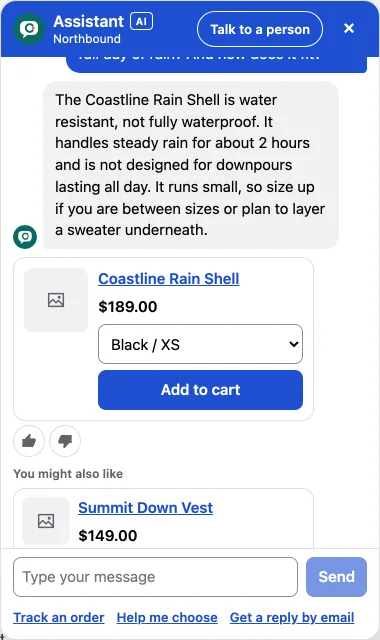
- With the live sizes in stock. Product cards show the sizes and colours you have, mark sold out sizes, and let the shopper add the right one to the cart in the chat.
- From your reviews, as opinions. On Growth and Pro, Catchly can share what your published reviews say about fit and feel, presented as shopper opinions, not as facts from the store.
- Honestly when the store does not say. If you have no size guide and no fit notes for a product, Catchly does not invent one. It says it is not sure and offers a person, or takes the shopper's email for a reply.
Set it up in a few minutes
- Make sure your store has a size guide page, or add fit notes to your product descriptions, for example "Fit: runs small, size up" or "Size: model is 183 cm and wears M".
- In Catchly, open the Skills tab. The Size advice skill shows Ready once Catchly has found a size guide page or fit notes.
- Ask a test chat the way a shopper would: "I am usually a medium, which size should I get in this jacket?" Check the store pages listed under the answer.
- If an answer is not right, use Fix this answer once, and the chat follows your correction from then on.
Tips for better sizing answers
- Write fit facts plainly on the product page. "True to size", "relaxed fit" and "size up if between sizes" are all easy for shoppers and for the chat.
- Keep one size guide per type of product if your sizing differs, for example tops and footwear.
- Check the Gaps tab each week. It lists questions the chat could not answer and products missing details such as size and fit.
What Catchly will not do
Catchly does not take body measurements or run a fit quiz, and it does not promise that an item will fit. It shares what your store says, so shoppers can decide with the facts in front of them. If they still are not sure, a person is one tap away.
Try it: ask our demo store whether the Coastline Rain Shell runs true to size.