Questions do not keep office hours
A live chat that shows "we are offline" at 10 pm turns a buying question into a lost visit. A bot that guesses can be worse, because it makes promises you then have to keep. What a small store needs after hours is simple: an honest answer when the store already has one, and a way to follow up when it does not.
How Catchly works after hours
- Answers from your store, day and night. Product, shipping and returns questions are answered from your own store data whenever shoppers ask.
- Business hours. Set your hours and time zone. Outside them, the chat tells shoppers your team will reply by email.
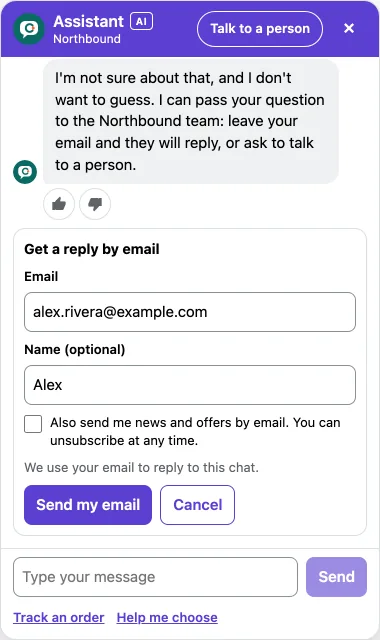
- Email capture when you choose. Ask for an email after the first answer, only when the AI is not sure, or when a person is needed outside your hours. There is no sign in wall before the chat.
- Offline email reply. When you answer a chat in your inbox and the shopper has gone, Catchly emails them your reply.
- Alerts. Email and in admin alerts when a shopper asks for a person, so the morning starts with a clear list.
Where the leads go
Every email a shopper leaves is saved as a lead in Catchly and added to your Shopify customers. Marketing consent is an unticked box the shopper chooses. A shopper is only subscribed to your email marketing if they tick it. On paid plans you can export your leads as a CSV file, and on Pro, shoppers who opted in can join the email marketing list you choose.
Even at your monthly cap
If your store reaches its plan's AI conversations for the month, the AI pauses, but the chat does not go dark. Shoppers can still ask a question and leave their email, and you can still reply. There is no overage charge.
Set it up
- In Catchly Settings, set your business hours and time zone.
- Choose when the chat asks for an email.
- Add the addresses that should get an alert when a shopper needs a person.
- Send a test chat outside your hours and check what a shopper sees.
Read more in the help center: Leads and Shopify customers and Inbox and taking over.